The Point is to know About... I Forgot

Friday, 30 September 2016

How To Create Fake conversations of facebook,Whatsapp

Yazzy app
  Features 
Seen
  • Yazzy is really awesome app!
  • With yazzy create fake, but very realistic conversations.
  • Supported fake screens:
  •  iPhone SMS with emojis support
  •  WhatsApp with emojis and images
  •  Facebook Messenger
  •  Facebook Status with comments and likes
  •  Tweets with hashtag and mentions
  •  Google searches
  •  WhatsApp groups with images and emojis
  •  Google translate
  •  Ask.FM
  •  iPhone WhatsApp with images and emojis
  •  Others fake conversation screens will come soon


Fake chat simulator
  Features
Taylor <3
  • NEW: New interface (Jul. 2015) featuring material design style!
  • NEW: Change contact's connection status (online, typing, etc.).
  • Send fake messages to the contacts and groups you create.
  • Real-like environment. Create and manage contacts and groups.
  • Set contacts picture, name, etc.
  • Incoming and Outgoing mode for texting. Pretend you receive messages from anyone.
  • Control read status and time. You can set any message as read/unread.
  • Create messages to be received in the near future (i.e., set the time of an incoming message)
  • Real notifications - you will receive notifications as if you were being actually texted.
  • Emoji support, camera and picture from gallery support. For custom emoji support you need a keyboard with Android Emoji support. 
Both app easily available from PlayStore
Share:

Wednesday, 28 September 2016

Virus


  • This virus must open on your school computer, college etc...!  
  • Too sexy, hot, awesome But harmless
  • To download Click Here


Share:

Monday, 26 September 2016

How To Become Hacker

  •   Change your desktop background EX: skull wallpaper, logo, Name in different font
 
  •      Change desktop resolution , set high( As possible )
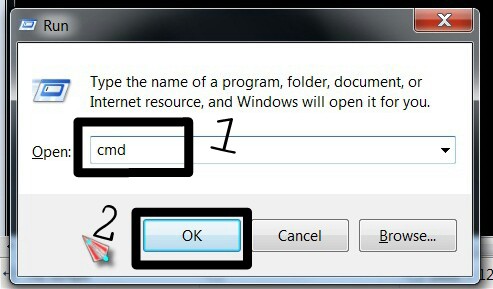
  • now go to RUN and type cmd.exe, hit enter

  •   Type into CMD
“Start” hit enter
“Start” hit enter
“Start” hit enter
  •   it will show 3 CMD
  •        go to start bar and right click or select
“Show window side by side"
  •       now type this on your all CMD
“Echo off” hit enter in 1st CMD
“Echo off” hit enter in 2nd CMD
 “Echo off” hit enter in 3rd CMD
  
  •   To set color on all CMD type
“Color a” hit enter in 1st CMD
“Color a” hit enter in 2nd CMD
“Color a” hit enter in 3rd CMD

  •      Now type on all CMD
“cls” hit enter in 1st CMD
“cls” hit enter in 2nd CMD
“cls” hit enter in 3rd CMD
    
  • Type on all CMD
  “Tree” hit enter in 1st CMD
  “Tree” hit enter in 2nd CMD
  “Tree” hit enter in 3rd CMD

  
  • again open new cmd !
  type “ping www.google.com -p”


IT’S SHOW OFF TRICK…!
IT’S NOT HACKING
Share:

Thursday, 8 September 2016

How to hack other’s whatsapp

There are 4 method 

1. By website
2. By Monitoring software
3. By handshake
4. By MAC Address Spoofing

WEBSITE

  • Many website provide whatsapp hacking but I never used it. So I have no idea about it.

MONITORING SOFTWARE

  • Monitoring app is easily available from market.
  • It’s not free services.
  • Few of them :  1. Mspy(Paid feature) 
                               2. Whatsappspy (Paid feature)     

Handshake (Working hax Which I USE)

1. You need two phones one’s your and another victim’s phone


2. By your phone open any browser ( Which Support Desktop site )
3. Go to URL: web.whatsapp.com
4. It’ll show like this 
5. Now you need your victims phone for 2 minutes
6. Open whatsapp from victim’s phone. now tap on 3 Square and select whatsapp web

7. Scan QR code 

8. After few seconds your phone show something like this.
9. Now victims whatsapp Full-Undercontrol.


THIS IS NOT HACKING
Now you can see all things which your victim do…..!


Share:

Wednesday, 7 September 2016

How to use 4G Jio sim in 3G phone

1.Go to phone dial pad.
  
2.Dial this number *#*#4636#*#* 
 3.Now tap on Phone Information 

4.You’ll see option name as Set preferred network type
5. Now tap on network type and select LTE/GSM/CDMA auto(PRL) 


Now power off your phone and insert SIM card and open it after 15 minutes
Share:

Friday, 2 September 2016

Create password recovery pen-drive for window 7


How to create password recovery pen-drive for window 7

  • If you forget your Windows password, you can use a password reset disk to create a new one. We recommend that you create a password reset disk when you create your password, so you don't lose access to your files and information.
  • To complete these steps, you'll need removable media (a USB flash drive).
  • 1. Insert your removable media.
  • 2. go to start menu > control panel > user account and family safety > user accounts.  
    click there
    •  3. In the left pane, click Create a password reset disk, and then follow the instructions. Make sure you store the password reset disk in a safe lace.
      Click On Next
      Select Drive & Next
      Write Current Password & Next
      Wait to Complete Process & Next 
      Finished


Share:

Ad

Facebook Page

The Green

Virus

Social Share

Name

Labels